Get paid at your .agt name
People can pay yourname.agt from MetaMask without copying an address. You choose the wallet that receives. Setting it up takes one transaction from the wallet that owns the name.
What you need
- A
.agtname. Register one if you have none yet. - The wallet that owns the name, open in the MetaMask browser extension.
- A small amount of POL in that owner wallet to pay gas on Polygon.
- An address to receive payments.
Choose the receiving wallet
Anyone who looks up your name can see the receiving address. Public addresses attract look-alike "dust" transfers. Their senders hope you later copy the wrong address from your history. A new account that only receives keeps your spending wallets out of view.
In MetaMask, open the account list and choose Add account. Name it after your .agt name and copy its address.
An ordinary MetaMask account has the same address on every EVM network. One address therefore covers all seven networks where wallets resolve .agt names. A Safe or another smart-contract account exists only on the chains where it was deployed. Receive on other networks covers that case.
Set the address
- Open agtnames.com/manifest and connect the owner wallet.
- Type your name and press Load name.
- Paste the receiving address into Payment address. It becomes the name's
agentWalletrecord. MetaMask offers it first on Polygon. - Paste the same address into Owner account. It becomes the name's
addrrecord. Wallets use it on Ethereum, Base, Arbitrum, Optimism, BNB Chain, and Avalanche. - Add a description if you like. Leave the endpoint rows empty unless your name runs an agent.
- Press Sign & publish. MetaMask asks you to sign the manifest and then to confirm one transaction.
Check that it works
Open agtnames.com/name/yourname. The receiving address appears under Agent wallet and Address.
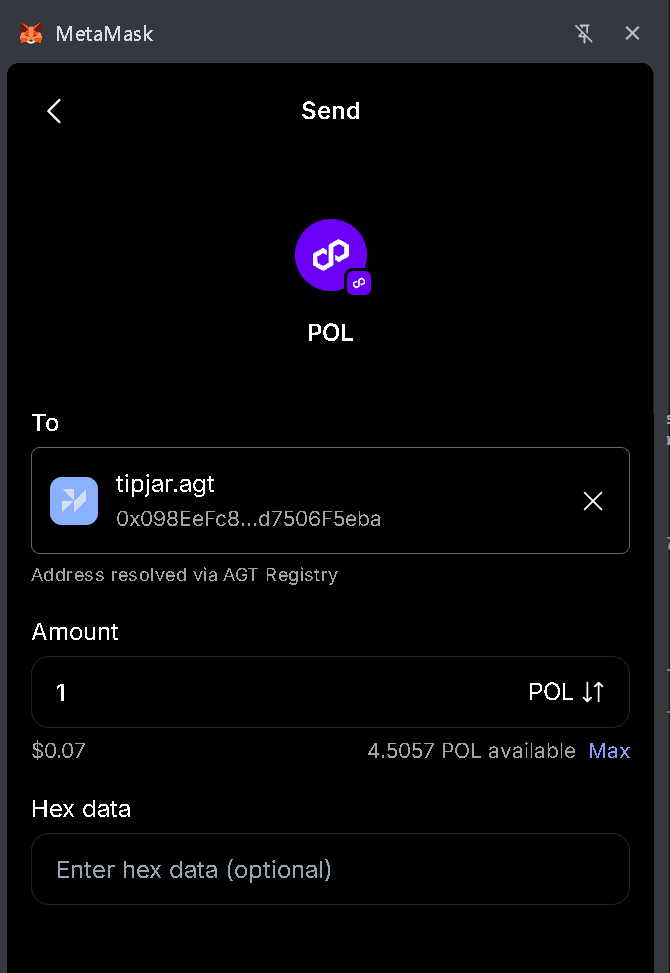
Then install the AGT Names Snap from the MetaMask guide. Start a send on Polygon and type yourname.agt as the recipient. The receiving address fills in with the label AGT Registry.
Receive on other networks
The editor's Other networks section holds one row per chain. Fill a row to receive on that chain at a different account. Wallets use that row ahead of the Owner account there. Set a row for each chain you want when the Owner account is a smart-contract account. Without a row, wallets offer nothing for your name on that chain.
Who can pay you
- Anyone using the MetaMask browser extension with the AGT Names Snap installed. MetaMask Mobile cannot run Snaps.
- Agents and apps that read
.agtrecords through the resolver SDK, the MCP server, or the HTTP API. - Anyone you send your name page to. They can copy the address there.
The editor also lists the payment address in your signed manifest as a USDC payment rail on Polygon.
Change or stop payments
Return to /manifest, change the addresses, and publish again. An empty Payment address clears the agentWallet record. Wallets then fall back to the Owner account. Change both fields to move every payment to a new wallet.
A name past its expiry resolves to nothing until it is renewed. Perpetual names never expire.
From the command line
The agt command writes the payment address from a terminal.
agt records set yourname --wallet 0x…Reference
- Pay a .agt name from MetaMask shows which address each network offers.
- Records & Resolution defines
addr,addr(coinType), andagentWallet. - Publish your agent's identity covers the rest of the manifest.